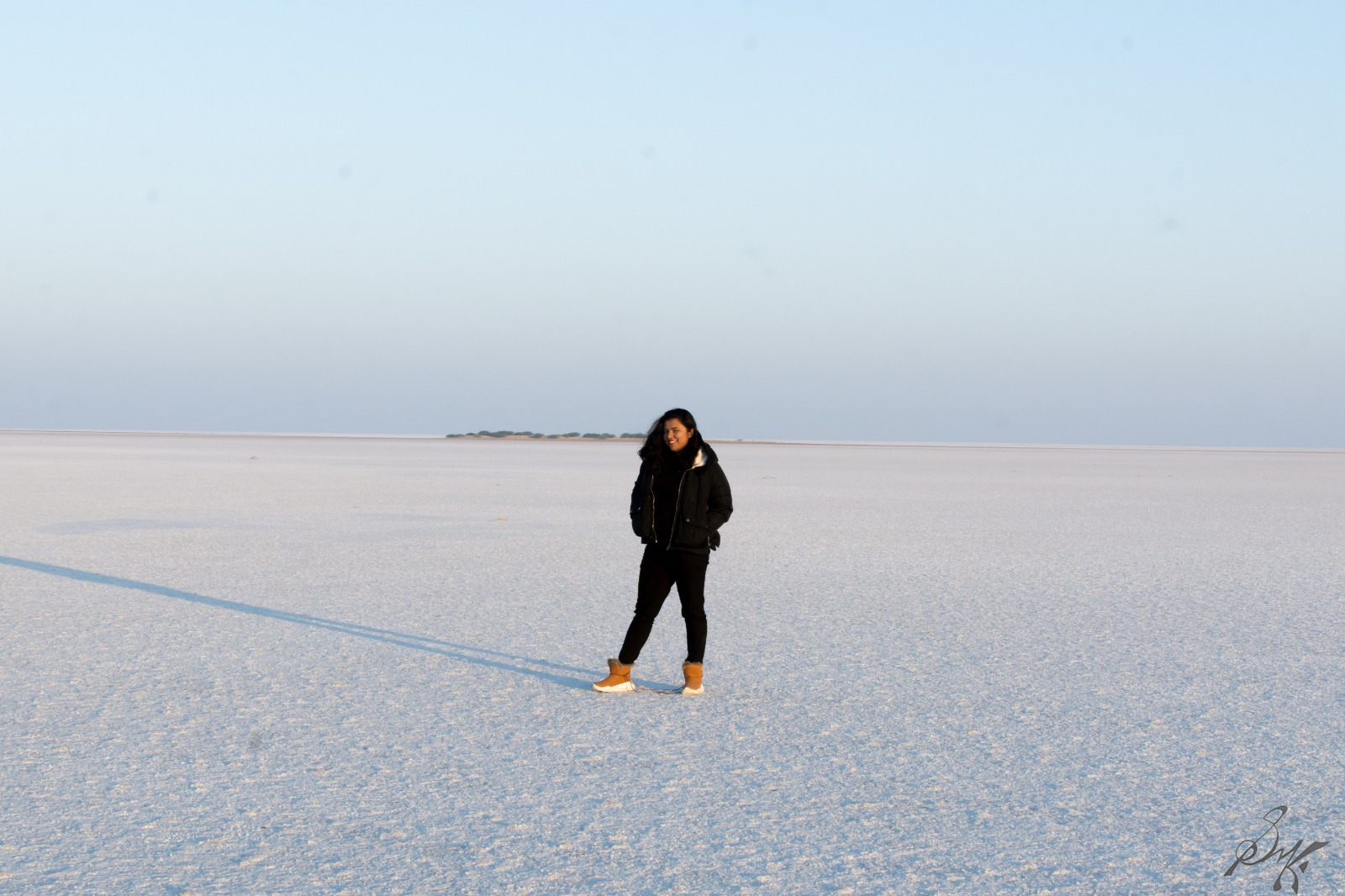
Mastering White Balance: Bringing Colors to Life in Your Photographs

Capturing vibrant and true-to-life colours is essential in photography. One crucial aspect that contributes to colour accuracy is white balance. Understanding and effectively controlling white balance can transform your images from dull to stunning. In this blog post, we’ll demystify the concept of white balance, explain its importance, and provide practical tips to help you achieve accurate colour representation in your photographs.

What is White Balance?
White balance refers to the adjustment of colours in a photograph to ensure that white appears neutral and that other colours are accurately represented. It is a vital setting that balances the temperature of the light source with the camera’s sensor, resulting in natural-looking colours. Different light sources emit varying colour temperatures, such as warm orange tones in incandescent lighting or cool blue hues in daylight. Understanding white balance allows photographers to correct these colour shifts and achieve accurate and pleasing colour renditions.

Importance of White Balance
Accurate white balance enhances the overall mood and impact of your photographs. It ensures that the colours you capture reflect the scene as you witnessed it, creating a sense of realism and authenticity. Proper white balance eliminates unwanted colour casts, such as the bluish tint in shaded areas or the yellowish cast in indoor lighting, providing a more pleasing viewing experience. Whether you’re shooting portraits, landscapes, or still life, mastering white balance empowers you to convey the intended emotions and atmosphere effectively.

White Balance Settings
Modern cameras offer various white balance settings, including Auto, Daylight, Cloudy, Shade, Tungsten, Fluorescent, and Custom. Auto white balance (AWB) is convenient but not always accurate, especially in challenging lighting conditions. Experimenting with different presets or manually adjusting the white balance can yield better results. Custom white balance allows you to calibrate it based on the specific lighting conditions, ensuring precise colour accuracy. Additionally, shooting in RAW format enables greater flexibility in post-processing, allowing white balance adjustments without sacrificing image quality.

Practical Tips for Accurate White Balance
a. Use a grey card or a white reference object to set a custom white balance accurately.
b. Utilize the Kelvin temperature scale to fine-tune white balance manually.
c. Pay attention to the colour of light sources and adjust accordingly (e.g., warm indoor lighting or cool shade).
d. Shoot in RAW format to have greater flexibility during post-processing.
e. Experiment with creative white balance adjustments to enhance the mood or convey a specific atmosphere.
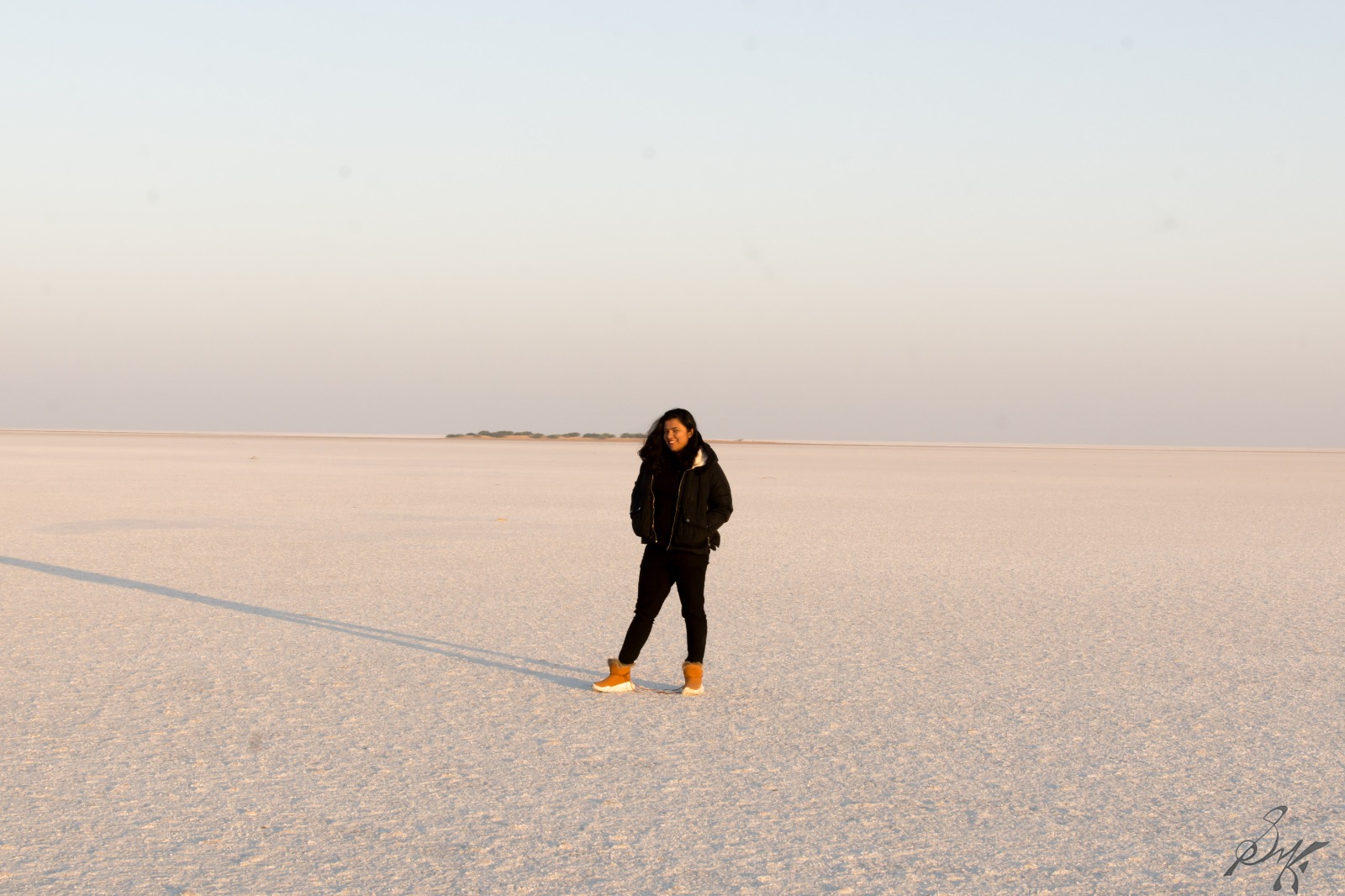
Mastering white balance is a skill that can elevate your photography and breathe life into your images. By understanding the concept, adjusting settings, and employing practical techniques, you’ll achieve accurate and captivating colours in your photographs. To put it simply, white balance ensures that the whites in nature appear as white in the photo as well. Embrace the power of white balance to accurately represent scenes, evoke emotions, and tell your visual stories with impact.

AtoZ Challenge: The Glossary

The AtoZ Challenge has already come to an end for the second time, and as a result, now a glossary of the terms can be made. I believe this shall come handy for future references!

A – Aperture, Artificial Horizon

B – Bulb Mode, Bokeh

C – Colour Temperature, Composition

D – Double Exposure , Depth of Field

E – EXIF Data, Exposure Bracketing

F – Forced Perspective, Focus Stacking

G – Ghosting, Grain

H – Hot Shoe, Hyperfocal Distance

I – Infinity Focus, ISO

J – Juxtapose, JPEG vs RAW

K – Keylight, Kelvin

L – Latitude, Lens Distortion

M – Manual Mode, Macro

N – Normal Lens, Noise Reduction

O – Optical Zoom, Overexposure

P – Panning, Post Processing

Q – Quality, Quiet Release

R – Red Eye Reduction, Rear Curtain

S – Spot Metering, Shutter Speed

T – Tonal Range, TTL Metering

U – Urban Landscape, Underexposure

V – Vignetting, Vibration Reduction

W – Watermark, White Balance

X – X Speed, X Process

Y – Your Rapport, You

Z – Zoom (Digital), Zoom Burst

Have a look at these terms and let me know if I ought to add some to the list.

Cheers!!

AtoZ Challenge: W – Watermark

Watermark

How important is a watermark? In my opinion, very! Times are such that it is important to take credit for your job, to ensure that no one else cashes in on it. A watermark is the simplest way to attempt this. You let a sign, a name, a phrase, that identifies uniquely to you be in the photo and proclaim that copying it unauthorized is a copyright violation. If, someday, someone steals your photos and you want to pursue them, having an inconspicuous watermark tucked in is useful.

Sometimes though, this philosophy is taken to the extreme and the watermark is made in a way that it is not worth taking the pains to edit it out, serves the purpose though.

Tell me about your thoughts on watermarking of photos.

Last time, W was for White Balance.

Cheers!!

AtoZ Challenge: C – Colour Temperature

Colour Temperature

Hot objects emit radiation. If the radiation were visible, say visible light, what would be the temperature of the body emitting the radiation? For example, for soft white light, it is accepted that the body must be at about 3000K. This 3000K is the colour temperature.

The usefulness of this knowledge in photography? Immense, unless you want to spend hours in the darkrooms making the photos look natural. The two photos below shall explain better.

Pug, Yellow Light, Cute, Unrealistic Colour
This one is a no colour correction photo, while the one below is with proper colour temperature settings dialled in.

Pug, Colour corrected, Brown and Blue , Realistic colours
Notice how the colour is realistic now. Since the place was lit by dim yellow lights, everything had a yellow tone, which is not the natural colour.
The settings that need to be tweaked within the camera to get realistic colours is the white balance. Dial in the on which matches your setting best, and shoot away.

Last time, it was Composition.

April AtoZ Chellenge: PH – W: White Balance

for White Balance

This is a in-camera option, for setting the color tone correctly while shooting under varying light conditions. Generally, options like cloudy, direct sunlight, shade etc are available along with the Auto mode. The Auto mode suffices mainly, but be advised, during shooting HDR photos, or making a timelapse video, change it to some other setting other than Auto. This is because, in the Auto mode, the white balance might change between the subsequent shots, something that is not desirable while shooting in a series. For flexibility, I shoot in RAW format, and fix the issues in post processing.

 DSC_1577-1 DSC_1577-1-3

DSC_1577-1-2

This is a part of April AtoZ Challenge. For the rest of the series, head here.

Cheers!!

AtoZ Challenge: PH – K: Kelvin

for Kelvin(Colour Temperature)

Yes, photographs also have a temperature aspect to them. They are judged with respect to which part of the spectrum the light might correspond and at what temperature of emission. What it means to me, I got another setting to fiddle with and tweak to my whim. Generally, changing the temperature, makes the photo appear more cooler or warmer. Cooler, being a bluish shade and warmer being the orange-yellowish shade. I use it to calibrate the white balance in my photos mostly. And yeah, shooting in RAW, helps a lot.

 DSC_a-2384-2  DSC_a-2384-3

This is a part of April AtoZ Challenge. A, B, C, D, E, F, G, H, I, J, K are done. Check them out.

Cheers!